Is it just me or do other people struggle with this
Hey @Yusuke. The struggle is real indeed.
But maybe you struggle with the app itself and then you are in the right place to help us improve!
What are you struggling with at the moment?
Ohh jeeezz! This is also happening to me, twice now! My total screen time today hasn’t even reached 2 hours, and opal blocked my Instagram and Youtube saying I’ve been using them for 2 hours TODAY when I haven’t opened it at all.
Done the reload blocks button, done the FAQ-Advanced reset, done anything they suggested and still nothing happened.
It’s sucks too their customer support replies very slowly. For a $100 a year app, this sucks!!
3 Likes
I’m experiencing the same issue, my total screen time today was 38 minutes, I have a limit for 3 hours across certain apps. For some reason it locked everything and said I had reached my limit. I’ve followed all of the FAQ steps, I’d like to avoid having to set a soft limit because it’s too easy to bypass. I’d rather have the hard limits but it’s challenging to do when limits are not implemented correctly. I have sent an email as well but it seems like support team responses tend to be slow or nonexistent.
3 Likes
hey @Peds ,
Happy to help. We’re investigating an issue with our Time Limit feature, and would appreciate more details! On that note, if you can please contact our Support inbox in-app for us to view your User Logs, that would help with the investigation. To do so, follow these steps:
- Open the Opal App
- Tap on your Opal “Settings” (accessible from the top right corner of your “Profile” tab)
- Tap on “Contact Us"
- Within the Support chat, tap the Mail icon (accessible in the top right corner)
- Compose and send your email
Note: if your Apple mail app is not connected to an existing email account, you will be unable to send a message. Please connect your email address to proceed.
Once we have your user logs, we can have our engineers take a look.
All the best,
Team Opal
1 Like
I am having this exact same issue now every night. App worked fine for me for several months but tonight I reached a 2 hour app limit at 12:25AM
1 Like
Same for me! This issue appeared to me a couple of months ago and since then nothing has changed. I have a 2 hours limit and a time limit session, in the morning they trigger both even tough the total screen time of the apps in the 2 hours session limit have not reached a total of 2 hours never. This is so frustrating and, the customer support sucks! It is the third time I contacted them without a proper response!
1 Like
I have hard limits that are working wonderfully for the apps I’m actually trying to limit. However the app is limiting apps that are not in my hard limits (like my camera and Amazon Alexa apps for ex) which is very frustrating to deal with. How can I fix this? I’m also concerned that it is going to be randomly limiting apps that I will need in emergencies, so this is making me a little nervous
1 Like
Yes, all of my time limits are active and reloading blocks or resetting screen time does nothing
1 Like
Yeah I don’t get it. I have a 2 hour a day limit but it gets triggered before I have two hours of screen time.
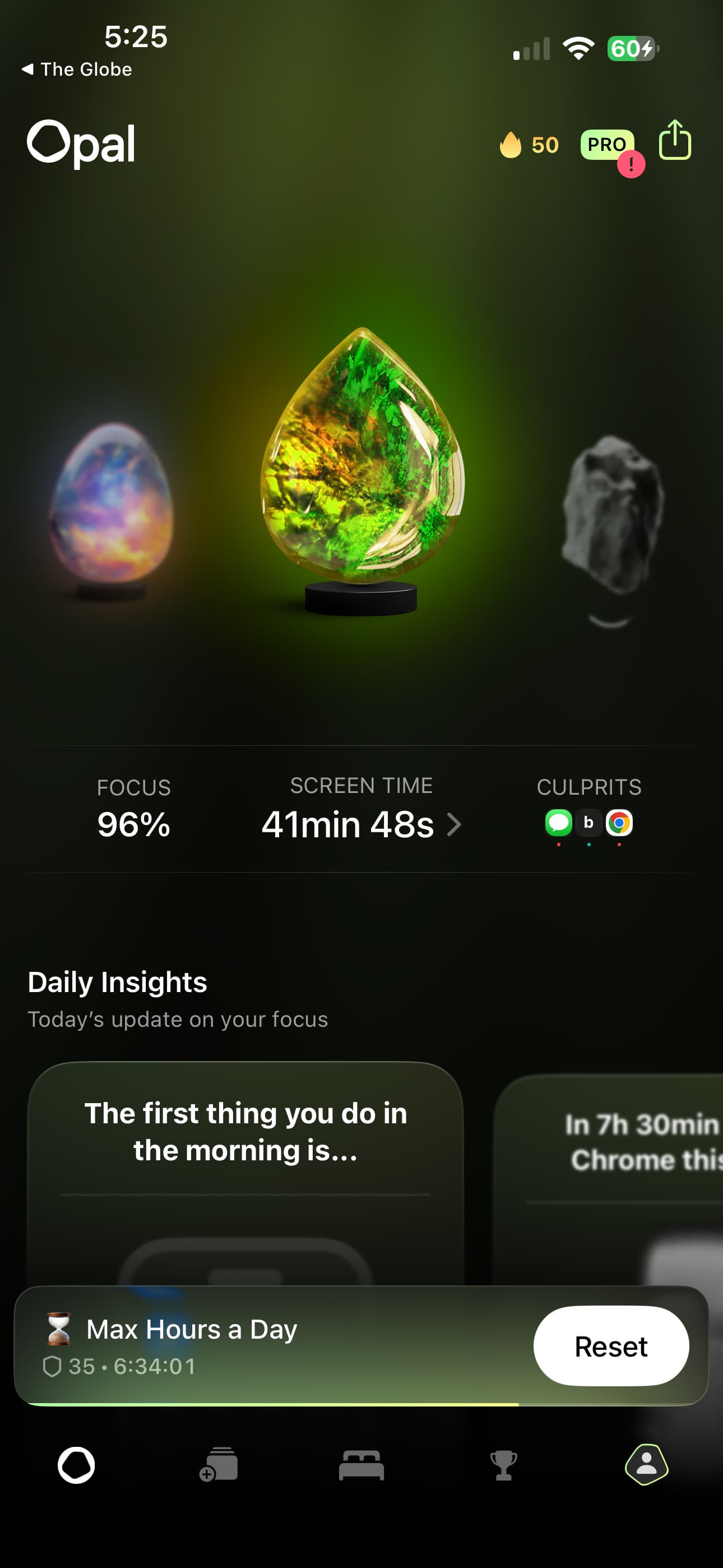
1 Like
Hey @Peds,
Thanks for reaching out, and sorry for the frustration. I’m afraid we’re encountering issues with our Time Limits initiating prematurely, and have escalated the issue to Apple. To sort out the issue on your device, please try the following troubleshooting steps:
- Delete your existing Time Limits (you may do so if they are already initiated by using your Emergency Pass. To use it, go to your “Profile” tab - “Settings” (accessible from the top right corner) - “FAQs” - “Advanced Features” - " Use My Emergency Pass" - “Tap here to use your Emergency Pass”). Unfortunately, if you’ve already used it this Week, our Support team is unable to cancel that Time Limit for you, so you’ll need to delete it before you open the app in question for the first time today
- Once the Time Limit is cancelled, immediately delete it
Until we’ve identified the cause of this issue, we’d recommend avoiding creating a new Time Limit. We’d instead recommend using the Session and Open Limits:
Thanks for your patience, and apologies.
Team Opal
Any updates on this? It seems like this feature is still not working properly
1 Like
hello,
this was 19 days ago, is there an update? i just purchased the pro subscription and i am running into this issues after 4 days. For 100 dollars a year i should be able to use all the features of the app.
RS
1 Like
It is very frustrating that my annual bill was just automatically renewed but the app is not working. It looks like the best way to correct this seems to be to delete everything I spent time setting up and starting over? With no guarantee I will not have same problem.
If I understand correctly, this has something to do with changes to iOS. Is there any information available on any progress made with Apple or to update your code to work with the IOS?
At this point, the app I decided to pay $100 a year to help manage time and stress is now taking up a lot of my time and causing stress.
And of course no one responds anymore to this thread  . We are left with an app that can be used only on sessions to block the apps, if you use the time limit feature, it will block the apps at the wrong time always!
1 Like
Same thing is happening repeatedly to me. Used the emergency pass last week to reset it. Used emergency pass again yesterday to reset, problem back again today and no emergency pass left! I can prevent Opal from accessing screen time on my phone, but that defeats the objective of the app! I’ve decided not to renew my subscription until it’s sorted, even though I really like the app. So frustrating, seems like an ongoing issue, and you just get standard automated replies when you try and contact their customer services.
1 Like
hey @Peds,
Thanks for reaching out, and sorry for the frustration. I’m afraid we’re still encountering issues with our Time Limits initiating prematurely due to a bug within iOS 26, and have escalated the issue to Apple who have not yet given us an update or a fix. To sort out the issue on your device, please try the following troubleshooting steps:
- Delete your existing Time Limits (you may do so if they are already initiated by using your Emergency Pass. To use it, go to your “Profile” tab - “Settings” (accessible from the top right corner) - “FAQs” - “Advanced Features” - " Use My Emergency Pass" - “Tap here to use your Emergency Pass”). Unfortunately, if you’ve already used it this Week, our Support team is unable to cancel that Time Limit for you, so you’ll need to delete it before you open the app in question for the first time today.
- Once your Time Limit(s) are cancelled, immediately delete them.
- Restart your device.
- Create a new Time Limit, but ensure the difficulty level is set to “Reset Allowed”
- Test the Time Limit. If it works correctly, you may set the difficulty level to “No way, I’m hardcore” (if you prefer) and set up additional Time Limits.
Otherwise, if your Time Limit continues to be triggered prematurely, I’m afraid you’ll need to delete it, and we’d instead recommend using our Session and Open Limit features in the meantime:
https://www.opal.so/help/what-are-sessionshttps://www.opal.so/help/what-are-open-limits
Finally, once Apple responds to our bug report and fixes the issue, we’ll be sure to let you know.
Thanks for your patience, and apologies for the inconvenience.
Team Opal
Opal miscalculates the screen time for app lock when I am charging my mobile device. This happens all the time when I am charging my apple device. By the time I disconnect the charger Opal claims I have used up my time limit which is not true. Please fix
Hey @Ola,
Thanks for reaching out, and sorry for the frustration. I’m afraid we’re still encountering issues with our Time Limits initiating prematurely due to a bug within iOS 26, and have escalated the issue to Apple who have not yet given us an update or a fix. To sort out the issue on your device, please try the following troubleshooting steps:
- Delete your existing Time Limits (you may do so if they are already initiated by using your Emergency Pass. To use it, go to your “Profile” tab - “Settings” (accessible from the top right corner) - “FAQs” - “Advanced Features” - " Use My Emergency Pass" - “Tap here to use your Emergency Pass”). Unfortunately, if you’ve already used it this Week, our Support team is unable to cancel that Time Limit for you, so you’ll need to delete it before you open the app in question for the first time today.
- Once your Time Limit(s) are cancelled, immediately delete them.
- Restart your device.
- Create a new Time Limit, but ensure the difficulty level is set to “Reset Allowed”
- Test the Time Limit. If it works correctly, you may set the difficulty level to “No way, I’m hardcore” (if you prefer) and set up additional Time Limits.
Otherwise, if your Time Limit continues to be triggered prematurely, I’m afraid you’ll need to delete it, and we’d instead recommend using our Session and Open Limit features in the meantime:
https://www.opal.so/help/what-are-sessionshttps://www.opal.so/help/what-are-open-limits
Finally, once Apple responds to our bug report and fixes the issue, we’ll be sure to let you know.
Thanks for your patience, and apologies for the inconvenience.
Team Opal